Understanding Antigravity's Indexing Process
When Antigravity (and similar agentic IDEs like Windsurf) says it is "Indexing," it is not just building a file tree like standard VS Code. It is essentially spinning up a local RAG (Retrieval-Augmented Generation) pipeline on your machine.
It is building a Semantic Code Graph. Here is exactly what is happening in those background processes (Antigravity Helper (Renderer)) that ate your RAM:
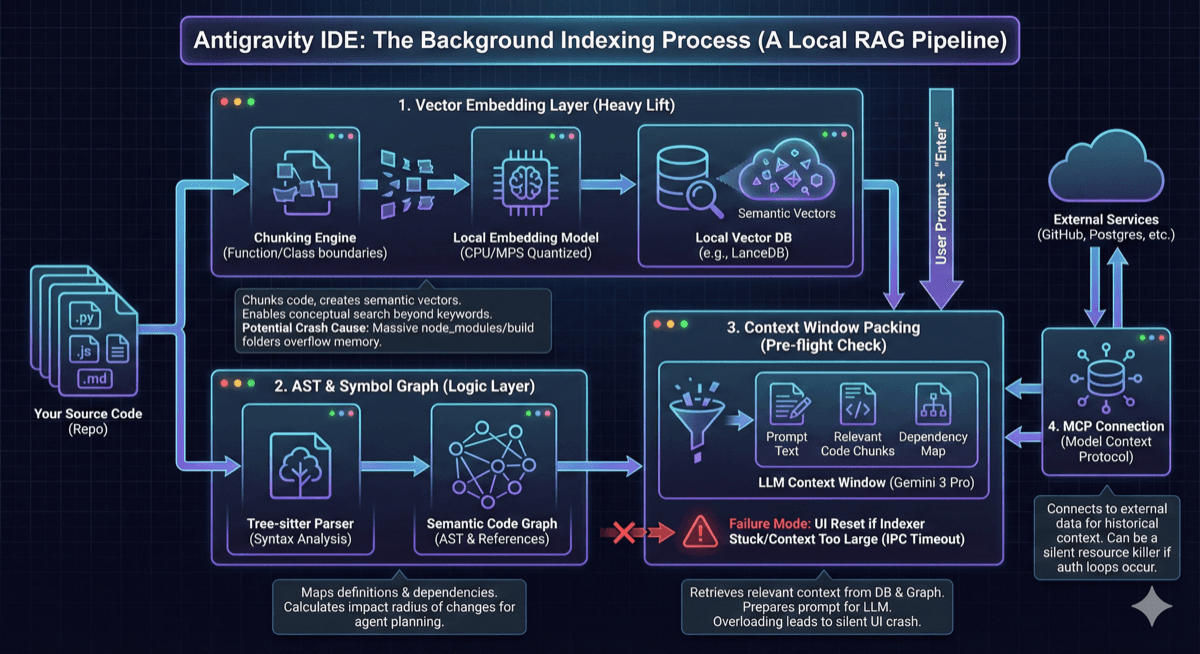
The Antigravity Indexing Process / RAG pipeline
1. The Vector Embedding Layer
The "Heavy" Lift
This is the most resource-intensive part.
What it does:
It chunks your source code (usually by function or class boundaries), passes those chunks through a small local embedding model (quantized for CPU/MPS), and stores the resulting vectors in a local vector database (often a hidden SQLite with vector extensions or LanceDB).
Why it does it:
So when you ask "Refactor the auth middleware," it doesn't just grep for the string "auth"; it uses semantic search to find code conceptually related to authentication, even if the word "auth" isn't present.
The Crash Cause:
If you have a massive node_modules, venv, or build artifacts folder that isn't .gitignore'd properly, the indexer tries to embed library code instead of just source code. This creates millions of vectors, overflowing the local memory buffer.
2. The AST & Symbol Graph
The "Logic" Layer
What it does:
It runs a Tree-sitter parser over your code to build an Abstract Syntax Tree (AST). It maps definitions to references across files.
Why it does it:
Agents need to know: "If I change this function in utils.py, what breaks in main.py?" Standard text search can't answer that; a dependency graph can.
The Antigravity Specifics:
Antigravity uses this to build what they call "Artifacts" (verifiable plans). It pre-computes the "impact radius" of potential changes so the agent can plan its task.
3. The "Context Window" Packing
The "Pre-flight" Check
This is likely where your 200-word prompt died.
The Process:
When you hit Enter, Antigravity doesn't just send your text. It looks at your prompt, queries the Vector DB (Layer 1) and the Graph (Layer 2) to find relevant files, and then "packs" the context window of the LLM (Gemini 3 Pro) with those files.
The Failure Mode:
If the indexer is stuck or the retrieved context is too large (e.g., it tries to stuff 2MB of text into the prompt), the IPC (Inter-Process Communication) channel between the UI and the Agent process can time out or segfault, causing the UI to "blink" and reset.
4. The "MCP" Connection
Model Context Protocol
Antigravity heavily relies on MCP (Model Context Protocol) to connect to external data (GitHub, Postgres, etc.).
If you have the GitHub MCP enabled, it might also be indexing your remote issues and PR history in the background to give the agent "historical context." This is a common silent resource killer.
Summary for your .gitignore
Prevent the indexer from choking
To prevent the indexer from choking again, ensure your project root has a .antigravityignore (or strict .gitignore) that explicitly excludes:
- •
node_modules/orvenv/ - •
dist/orbuild/ - •
package-lock.json/yarn.lock(The indexer hates parsing massive lockfiles) - •Any large binary assets (images, models)
Interactive Pipeline Visualization
Explore the architecture hands-on
Click on any node to see technical details. Use the simulation buttons to watch data flow through the pipeline or see what happens during a crash.
Antigravity Architecture
Local RAG & Indexing Pipeline
Select a component to view MLOps internals.
Further Resources
Learn more about agentic IDEs
Antigravity IDE Hands-On
A technical look at the "Agent Manager" and how indexing supports the creation of verifiable "Artifacts"